Clients
AdGuard Home offers flexible configuration options for connected devices. At the most basic level, you may simply want to distinguish between them and see friendly names instead of IP addresses. AdGuard Home also allows you to apply different rules depending on the client.
Friendly names
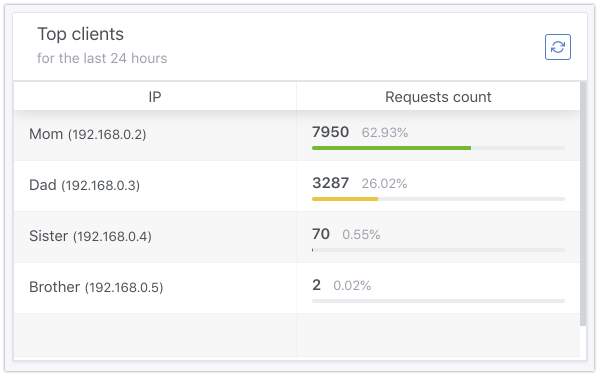
AdGuard Home tries to automatically collect some basic information about the device that’s connecting to it.
Here is what it tries to do in order to figure out the client’s hostname:
-
Inspects the hosts files (for example,
/etc/hosts) and uses hostnames found there to identify clients. -
Makes reverse DNS lookups.
-
Inspects the system ARP table.
-
For public IP addresses, it also makes WHOIS queries in order to find out the client’s location and the company the IP belongs to.
-
For IP addresses leased by AdGuard Home’s DHCP server, it obtains the hostname from leases.
If you only need to see friendly names in the AdGuard Home stats, editing the hosts file is probably the easiest way to achieve this. Please note that you may need to restart AdGuard Home to apply the changes.
Runtime clients sources can be disabled via the clients.runtime_sources object of the configuration file.
Persistent clients
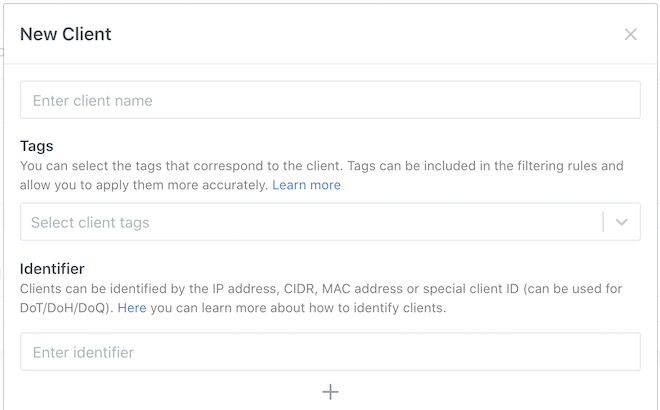
If you want more than just the client names, you will need to configure each client manually. To do so, go to Settings → Client settings and click Add client.
Identifying clients
First of all, you need to decide how you would like to identify the client. There are several options to do this.
-
IP address. For instance,
192.168.0.1. This is the easiest way to do this, but it may be not good enough if the IP address changes too often. -
CIDR range. For instance,
192.168.0.1/24. It allows attributing a whole range of IP addresses (in this example,192.168.0.*) to the same client. -
MAC address. Using MAC as a client identifier is only possible when AdGuard Home works as the network’s DHCP server.
-
ClientIDs. Special identifiers that can be used with some encrypted DNS protocols. See below.
ClientID
ClientIDs are identifiers that can be used with the following DNS protocols: DNS-over-HTTPS, DNS-over-TLS, and DNS-over-QUIC. To use this identifier, clients should perform queries using a special domain name or URL. Např:
-
AdGuard Home has the domain name
example.org. -
In AdGuard Home, add a persistent client with the ClientID
my-client. -
On the client device, you can now configure the following:
poznámkaThe URL ClientID has higher priority than the server-name ClientID. If you use both, only the URL ClientID is used.
-
DNS-over-HTTPS:
-
URL ClientID:
https://example.org/dns-query/my-client. -
Server-name ClientID:
https://my-client.example.org/dns-query(requires a wildcard certificate).
-
-
DNS-over-QUIC:
quic://my-client.example.org(requires a wildcard certificate). -
DNS-over-TLS:
tls://my-client.example.org(requires a wildcard certificate).
-
Note that the TLS certificate must be valid both for *.example.org and example.org.
Settings
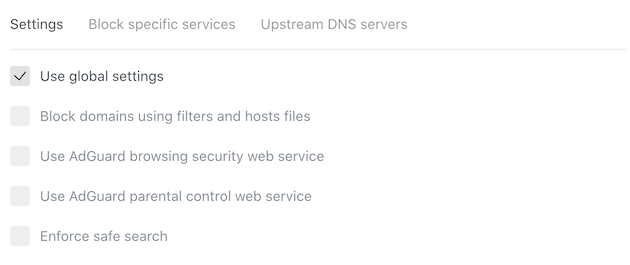
Each client can be configured individually. You may choose what to block, what settings should be used, or you could even configure a completely different set of upstream DNS servers to be used for this client.
Per-client blocking
There are two ways of how you can configure blocking on the per-client basis. Both of them are based on using AdGuard blocklist rules syntax for the rules you’re adding to Custom filtering rules.
client rules
The first method uses the client modifier. It allows you to limit the rule to a specific client or clients.
Příklad:
-
@@||*^$client=127.0.0.1: Unblock everything for localhost. -
||example.org^$client='Frank\'s laptop': Blockexample.orgfor the client namedFrank's laptoponly. Note that quote (') in the name must be escaped. -
||example.org^$client=192.168.0.0/24: Blockexample.orgfor all clients with the IP addresses in the range192.168.0.0-192.168.0.255.
You can find more client examples in the article about the filtering rules syntax.
ctag rules
The second way is to use another modifier called ctag. When you create a new client, tags can be assigned to it. These tags can then be used in the filtering rules.
Příklad:
-
||example.org^$ctag=device_pc|device_phone: Blockexample.orgfor clients tagged asdevice_pcordevice_phone. -
||example.org^$ctag=~device_phone: Blockexample.orgfor all clients except those tagged asdevice_phone.
You can find more ctag examples as well as the full list of tags in the article about the filtering rules syntax.