

Your privacy
protection center


FAQ
-
DNS stands for Domain Name System. Think of it as of "address book" of the Internet: your browsers and apps use it to translate domain names that make no sense to them into IP addresses that they can understand.
-
AdGuard DNS is a free, privacy-oriented ad-block DNS server. In addition to resolving DNS requests, it blocks ads, trackers, and malicious domains. You can use it instead of your current DNS provider.
-
When you use AdGuard DNS, every time your browser or app sends an inappropriate DNS request, our DNS server sends back a null response instead of an IP address. To prevent ads, tracking, and fraud, AdGuard DNS uses a frequently updated database of domain names.
-
It has three different modes, depending on which server addresses you use. "Default" mode is for blocking ads, trackers, malware and phishing websites. "Family protection" does the same, but also blocks websites with adult content and enforces "Safe search" option in browsers that provide it. "Non-filtering" provides a secure and reliable connection but doesn't block anything.
-
AdGuard DNS takes several measures to ensure your privacy. It supports all popular secure DNS communication protocols: DNSCrypt, DNS-over-HTTPS (DoH), DNS-over-TLS (DoT), and DNS-over-QUIC (DoQ).
-
Instead of a regular client-server interaction protocol, AdGuard DNS allows you to use a specific encrypted protocol — DNSCrypt. Thanks to it, all DNS requests are being encrypted, which protects you from possible request interception and subsequent eavesdropping and/or alteration.
-
Yes, due to the nature of how DNS works, all DNS traffic of your device will go through AdGuard.
-
The instructions on how to configure AdGuard DNS on different operating systems will vary. Go to Setup guide, find the one suitable for your case, and follow it to configure AdGuard DNS on your device.
-
They are modern secure DNS protocols that gain more and more popularity and will become the industry standards for the foreseeable future. Both are more reliable than DNSCrypt and both are supported by AdGuard DNS.
-
DNS-over-QUIC is a new DNS encryption protocol and AdGuard DNS is the first public resolver that supports it. So what's good about it? Unlike DoH and DoT, it uses QUIC as a transport protocol and finally brings DNS back to its roots — working over UDP. It brings all the good things that QUIC has to offer — out-of-the-box encryption, reduced connection times, better performance when data packets are lost. Also, QUIC is supposed to be a transport-level protocol and there are no risks of metadata leaks that could happen with DoH.
-
AdGuard DNS supports DNSSEC technology which allows you to verify the authenticity of the stored DNS records with a digital signature. It provides protection against current and potential attacks on DNS queries and responses aiming to forge them or change their content, and at the same time it fends off other online threats.
-
You can use public AdGuard DNS servers for free — there's no catch. However, we incorporate AdGuard DNS in many paid AdGuard and AdGuard VPN apps. We also offer paid personal AdGuard DNS servers with advanced functionality and more customization options.
-
There are no restrictions for which devices you can use it with. You can find a separate configuration manual for each platform on this page.
-
AdGuard DNS uses default port 53. In case port 53 is blocked or unavailable, use port 5353 instead.
-
You will find everything related to AdGuard DNS on GitHub, or you can just ask us by contacting our support: support@adguard-dns.io. We will answer you as soon as possible.
AdGuard DNS server locations

Shivam Very well in saving us from ads but some of them are not removed and sometimes website detect ad blockers.
Uros24 Thank you for blocking ads
Godgaming This dns blocker is very good but the only things is can’t block EVERY trackers (I tested here: https://d3ward.github.io/toolz/adblock)
Seleriii Now I'm a big fan of AdGuard DNS. Thank you guys for putting my privacy first
Jean Occasionally, it can be a bit aggressive with legit sites
Aoki My go-to DNS server right now. Blocks ads, trackers, and other unsafe stuff

Failed to send review
Try AdGuard DNS for free
Latest news
-
February 19, 2026
AdGuard DNS v2.20: Custom blocklists and enhanced accessibility
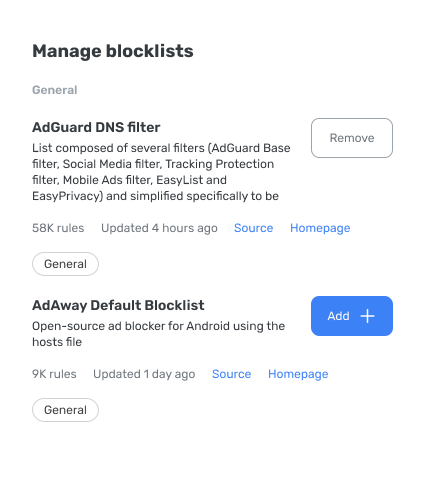
With the release of AdGuard DNS v2.20, custom blocklists are now supported, allowing you to use your own filters alongside the built-in lists. -
February 13, 2026
AdGuard DNS mobile app v1.2: A smarter experience for both users and administrators
Version 1.2 takes reliability, security, and user comfort to the next level — especially for those managing devices in corporate environments. -
February 4, 2026
Game changer for your Web: Discounts on all AdGuard products
Stay on top of your game this season: get any AdGuard product at a discount and keep your devices protected. -
December 29, 2025
AdGuard 2025 year recap
It is time to look back at the passing year and reflect on everything that we’ve done and what we’ve written about. This is AdGuard’s 2025 year recap!
All done! Something went wrong Subscribe to our news