LG smart TVs and the surveillance behind the screen
We have long criticized what has somehow become the new normal: TVs and other connected devices acting as literal spies in our living rooms, bedrooms, and offices.
The latest Gamers Nexus investigation is a prime example of the snooping high-end brands like LG can do behind the scenes — or rather, behind the screen. The original video runs for more than two hours, and we strongly recommend watching it in full: it is meticulous, entertaining, and deeply unsettling. For anyone short on time, here are the key revelations.
Your TV is listening to you when you don’t expect
After the researchers accepted LG’s TV agreements — six of them, with four more documents waiting at the LG Account stage if they wanted to use apps — the TV got busy.
It took roughly six-second slices of audio from whatever was playing, turned them into compact digital fingerprints, and sent those fingerprints to servers operated by LG Ad Solutions, also known as Alphonso. This happened not only with LG Channels and smart features, but also when the TV was being used simply as a monitor for a laptop connected over HDMI.
The data sent to Alphonso’s servers tied each fingerprint to a device ID, a timestamp, the active input, and an approximate location. Before the agreements were accepted, the researchers saw no fingerprints being sent. But the TV was far from quiet. It still exchanged data with LG’s advertising and customer-data servers and repeatedly scanned the local network, detecting computers, phones, servers, printers, network switches, and other connected equipment.
LG maps your home and then some
Across the researchers’ tests, this network sweep found at least 38 devices, including personal phones, work computers, smartwatches, a thermostat, and other smart-home equipment.
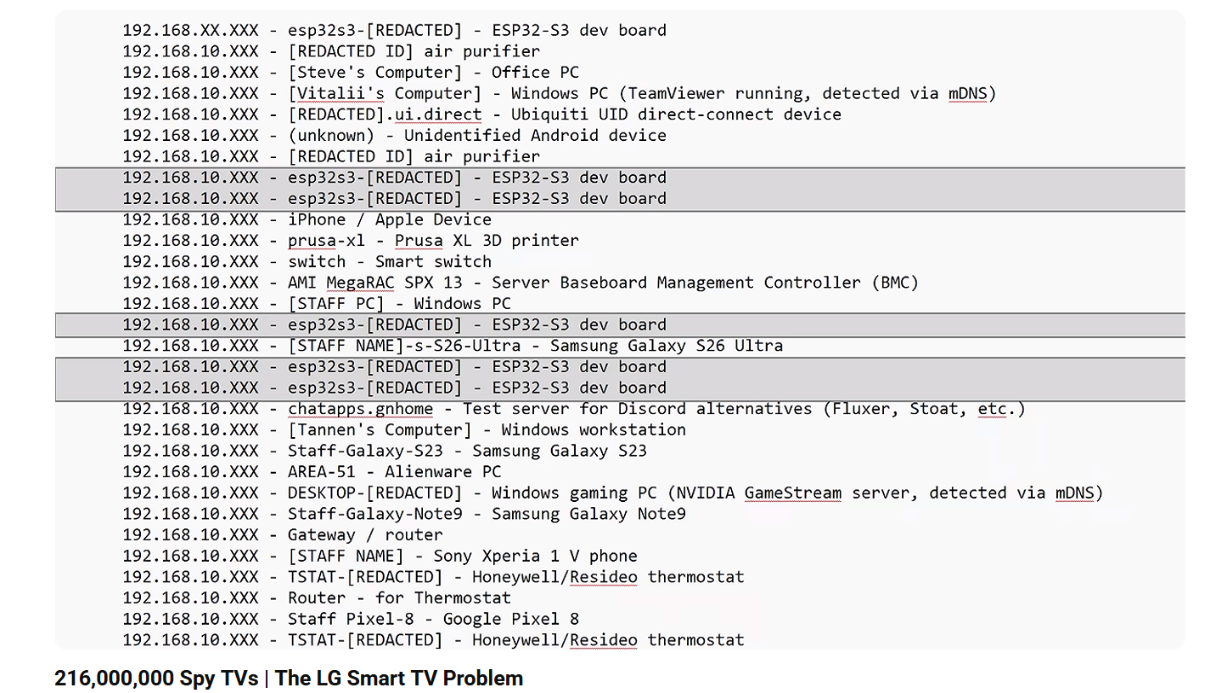
Screenshot from the Gamers Nexus investigation on YouTube.
LG says device discovery helps its TVs connect to other equipment. It also acknowledges that nearby Wi-Fi networks and their signal strength may be used to estimate the TV’s location. Whatever the stated purpose, most people do not expect a television to quietly map their home network and help pinpoint where it is.
The traffic captures put the scale of this activity into numbers. In one hour-long test, an LG G3 used only as an HDMI display sent requests to 29 different endpoints, making 107 connections in total. Forty-four of those connections went to Alphonso’s servers, with around 4 MB of data transferred.

Screenshot from the Gamers Nexus investigation on YouTube.
A newer LG QNED model was no quieter. During another 50-minute HDMI test, it connected to 22 endpoints 157 times. Fifty-four of those connections went to Alphonso, carrying 5.2 MB of data.
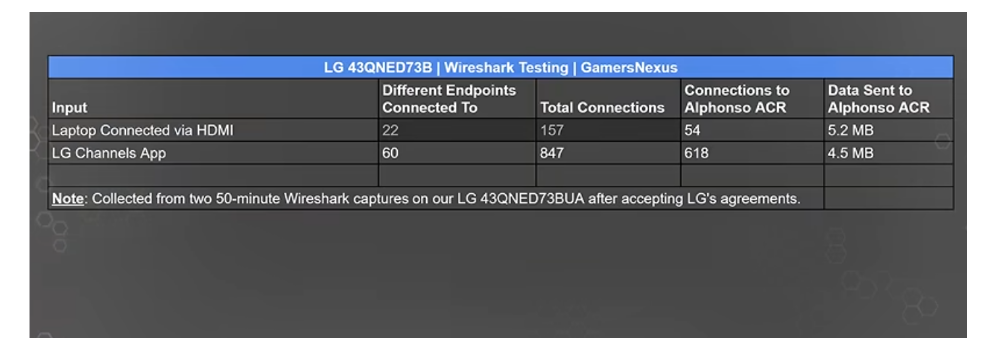
Screenshot from the Gamers Nexus investigation on YouTube.
Capturing sound from 70 ft away
After the wake phrase was used, the researchers found plain-text transcripts of what the TV heard stored in its memory. Even after the person had finished giving the TV an instruction, it did not always stop listening. The TV waited for around 10 to 15 seconds of quiet before closing the session. If someone nearby spoke during that time, their conversation could also end up in the transcript. With the microphone sensitivity increased, the TV picked up intelligible speech from nearly 70 feet away.
LG’s own statement says a voice-recognition session can last for up to approximately 18 seconds and acknowledges that nearby speech may appear in recognition results. LG maintains that this is not continuous recording outside an activated session. In practice, one deliberate “Hi LG” can still be followed by several seconds of private speech that was never meant for the TV. The researchers did not prove that LG uploaded these transcripts; they found them stored on the TV. But capturing more speech than the user intended is a privacy problem in itself.
Your remote may be listening too
The investigation then moved from data collection to security flaws. The researchers showed that an attacker could turn the TV into a listening device even after its main built-in microphone had been switched off. They captured HDMI audio and sound from a connected USB webcam, intercepted the remote’s microphone while its voice button was pressed, and reconstructed speech from a separate low-quality “speaker feedback” mic. Switching the microphone off silenced it, but it did not stop a compromised TV from listening.
Imagine a confidential call in a hotel conference room or a telehealth appointment shown on a larger screen. The TV looks like a passive HDMI display, yet a compromised set could record the audio while offline, store it locally, and give it up once reconnected. That scenario is not purely hypothetical. In a staged boardroom test, the researchers captured a conference call through HDMI while the TV had no internet connection, then retrieved the saved audio after it came back online.
LG’s tracking and these security flaws are separate problems. But they expose the same privacy risk: the screen in the room can become another set of ears.
The technology behind the tracking
What the researchers saw in those traffic captures has a name: Automatic Content Recognition, or ACR.
In simple terms, the TV takes short samples of what is playing, turns them into fingerprints, and checks them against a media database. This can reveal whether you are watching a film, show, game, or ad — even when it comes from a console or laptop connected over HDMI.
The technology is not new, and neither are the privacy concerns around it. We have covered them repeatedly — from how smart TVs identify what you watch and LG putting ads into screensavers to LG tracking content shown through PlayStations and other HDMI devices.
LG explains in its ACR and Viewing Information Agreement and privacy statement that ACR can analyze live TV, LG Channels, and content from HDMI devices. The fingerprints may be combined with details about the TV, content source, network, location, and consent settings.
The pitch to advertisers is even blunter. LG Ad Solutions says it collects viewing data “at the glass level” and uses it to target people based on shows, apps, games, consoles, subscriptions, ad exposure, viewing habits, and location. Its website even invites advertisers to “own the living room and surround the connected LG household beyond the TV”.
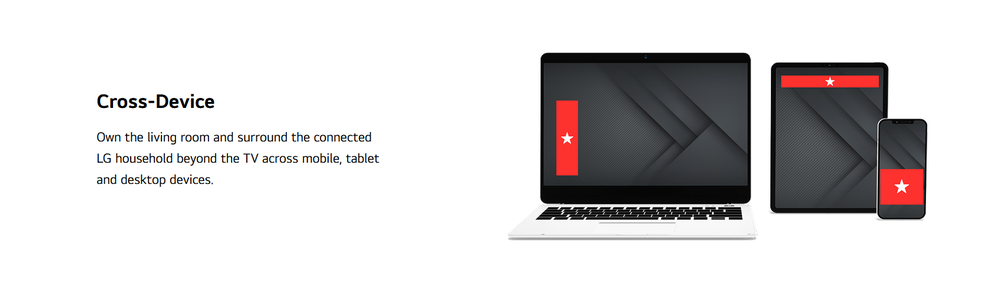
Screenshot from the Gamers Nexus investigation on YouTube.
Gamers Nexus showed what that sales pitch looks like from the other side of the screen: a premium TV identifying whatever passes through it, linking that information to other device data, and sending it to advertising servers — even when the TV is being used as nothing more than a monitor.
Dark patterns turn choice into surrender
LG says ACR, voice recognition, and interest-based advertising are optional and off by default. It also treats ACR and personalized ads as separate agreements. On paper, the choice sounds simple.
On the TV itself, however, things get murkier. To download an app, the researchers needed to accept only LG’s Terms of Use and Privacy Policy. Yet the TV displayed six agreements and highlighted Select All. The four extras — covering ACR and viewing data, voice information, interest-based and cross-device advertising, and marketing communications — were optional. That distinction was there, technically. LG’s interface just made it very easy to miss.
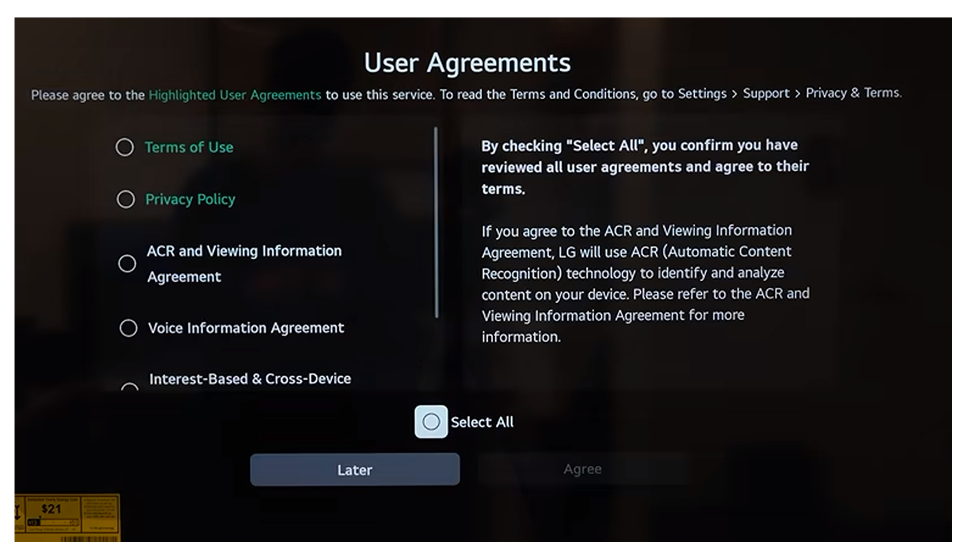
Screenshot from the Gamers Nexus investigation on YouTube.
Some apps then required an LG account, adding four more documents. The LG Account Terms of Use, LG Account Privacy Policy, and Smart Media Product Membership Privacy Policy were required; the marketing agreement was not. But the interface did not mark it as optional: all four agreements looked equally necessary, while Select All was highlighted again — another dark pattern nudging users toward a marketing opt-in.
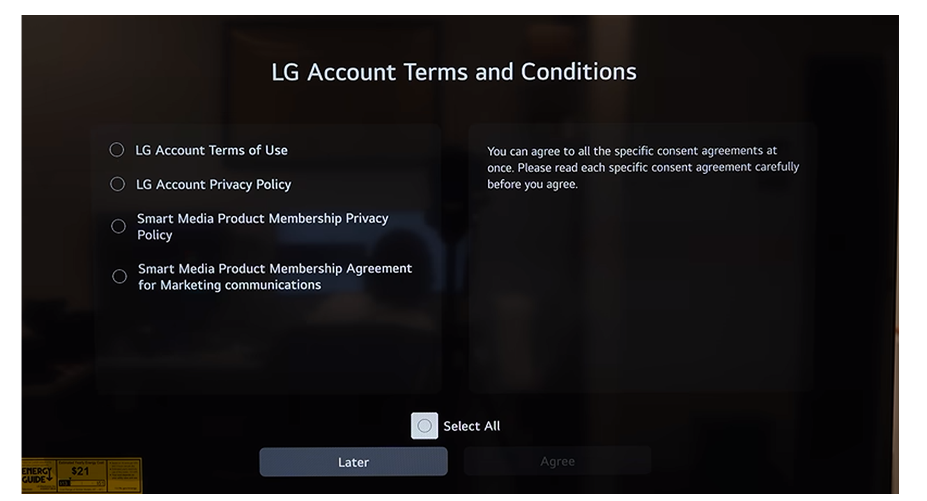
Screenshot from the Gamers Nexus investigation on YouTube.
If someone actually followed LG’s advice and carefully read every agreement, they would need plenty of patience — and perhaps fresh batteries for the remote. Navigating the six TV agreements took 1,246 button presses. The four LG Account documents required another 1,459. That is 2,705 button presses just to get through the first layer.
Those ten documents already contained more than 30,000 words. LG’s separate US Terms of Use and general privacy policy added another 17,000, bringing the total close to 50,000 words — around three to four hours of reading. And this was not 50,000 words of harmless boilerplate: important details about the collection of IP and MAC addresses, location, audiovisual data, router information, and activity from connected devices were scattered across the documents and buried deep in the legalese.
The settings were not much clearer. A toggle called “Cookies” applied only to cookies used to limit how often the same ad appears — not advertising or tracking cookies in general. On another older LG TV, a series of firmware updates added a new Limit Ad Tracking setting. It had not been there before and appeared switched off by default — meaning ad tracking was not limited, even though the owner had accepted no new terms.
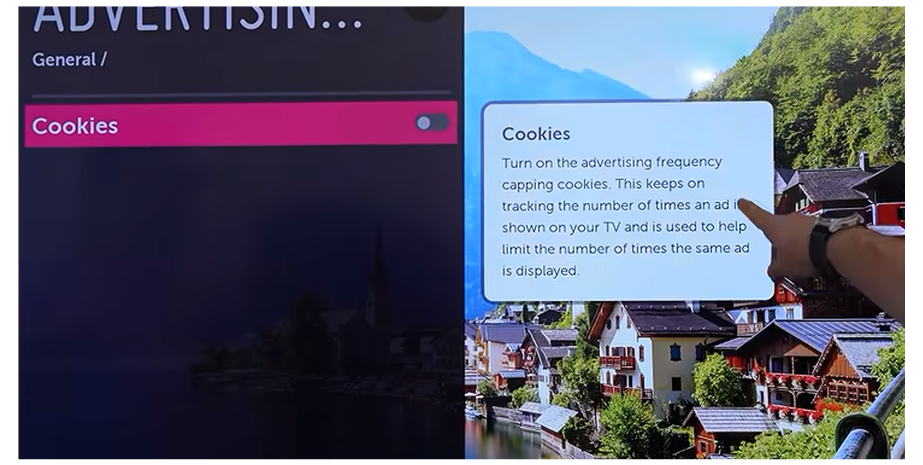
Screenshot from the Gamers Nexus investigation on YouTube.
Users can technically say no. But when saying yes takes one highlighted button and understanding the alternative takes 2,705 presses and several hours of legal reading, calling that informed consent is generous.
What AdGuard users can do about it
The surest way to stop a smart TV from phoning home is to cut it off the Internet (and keep it that way — Gamers Nexus showed that a hacked TV can save audio offline and hand it over once reconnected). For anyone who still wants smart features, AdGuard offers several layers of network protection.
The easiest option is public AdGuard DNS. It is free and can be set up on the TV or, better yet, on the router to protect the whole network. It blocks known ad, tracking, phishing, and malware domains, but does not provide per-device statistics or custom rules.
Private AdGuard DNS adds those controls. Users can see which domains each device contacts, choose blocklists, create rules, and configure filtering separately for each device — including the TV. That makes it much easier to see what the LG in the corner is trying to reach.
Those who prefer to keep everything on their own hardware can use AdGuard Home. It offers detailed logs, custom filters, and per-device rules without sending DNS processing through a third-party server, though it takes more effort to set up.
In fact, AdGuard Home received an unexpected cameo in the Gamers Nexus follow-up. One Reddit user placed an LG C4 on an isolated IoT network and routed its DNS through AdGuard Home. In less than 12 hours, us.nextlgsdp.com had become the top blocked domain, generating 4,615 requests. According to the owner, the TV had not even been turned on during that period. Another user reported that their LG TV consistently topped the blocked-request list.
This is what DNS filtering does well: it reveals where the TV is trying to connect and blocks unwanted destinations. But it can only guard the door; it cannot change what happens inside the TV. The thing is that DNS filtering blocks whole domains. If tracking and a useful feature share the same domain, blocking it may also break an app, recommendation, or update. It also cannot stop local ACR processing, microphone capture, network scanning, or security flaws.
For stronger isolation, put the TV on a separate IoT network or VLAN and use firewall rules to keep it away from computers, phones, and other trusted devices. On Android or Google TV, AdGuard for Android TV can add on-device filtering and firewall controls. It cannot be installed on LG’s webOS.
No single tool can turn an opaque smart TV into a private device. The practical choice is between keeping it offline and limiting how much of the home network and the outside world it is allowed to reach.
LG’s response leaves the central problem intact
To nobody’s surprise, LG dismissed the Gamers Nexus report as “untrue” — fake news, in so many words. It later published a more detailed statement on smart TV privacy, prompting a point-by-point response from Gamers Nexus.
Ironically, in trying to tear down the report, LG confirmed quite a lot. ACR does indeed work on HDMI content and can combine the fingerprints it creates with information about the TV, the content source, and the network. It can also use nearby Wi-Fi networks to estimate location. LG also acknowledged that viewing data may be shared with LG Ad Solutions. In places such as California, which has some of the strictest privacy laws in the US, that may legally count as selling or sharing personal information.
LG’s defense mostly boils down to two points: users agreed to it, and ACR sends fingerprints rather than raw recordings. But nobody accused LG of uploading entire films. The problem is that the TV recognizes whatever comes through its HDMI ports and ties that activity to device, network, location, and advertising data.
Likewise, calling ACR “optional” does not make all of this fine. Not when Select All is highlighted, settings have confusing names, tracking-friendly options appear by default, and finding out what you are agreeing to takes thousands of button presses and hours of legal reading. LG insists it does not use dark patterns. It just never explains why its interface behaves so much like one.
LG’s response may fill in some technical blanks, but if anything, it confirms just how much data collection can hide behind an ordinary TV screen. The investigation and follow-up are worth watching in full. They show this is bigger than one setting or chatty domain: a smart TV has microphones, tracking technology, and a front-row seat to your life at home. “Off” should mean off, and a TV used as a monitor should behave like one — without 2,705 button presses and nearly 50,000 words of legalese.