AdGuard DNS v2.25: Detailed blocklist statistics and improved checkout flow
With AdGuard DNS v2.25, we’re bringing deeper insight into blocklist effectiveness and a clearer checkout. Here is what’s new.
See exactly which blocklists are doing the heavy lifting
Blocklists are sets of rules that filter out ads, trackers, and online threats. With dozens available, you can combine several at once to tailor protection to your needs — for instance, pairing the AdGuard DNS filter for general ad blocking with the AdGuard DNS Popup Hosts filter and a regional language list.
And now, with the new Top blocklists card in Statistics, you can easily evaluate their real-world impact.
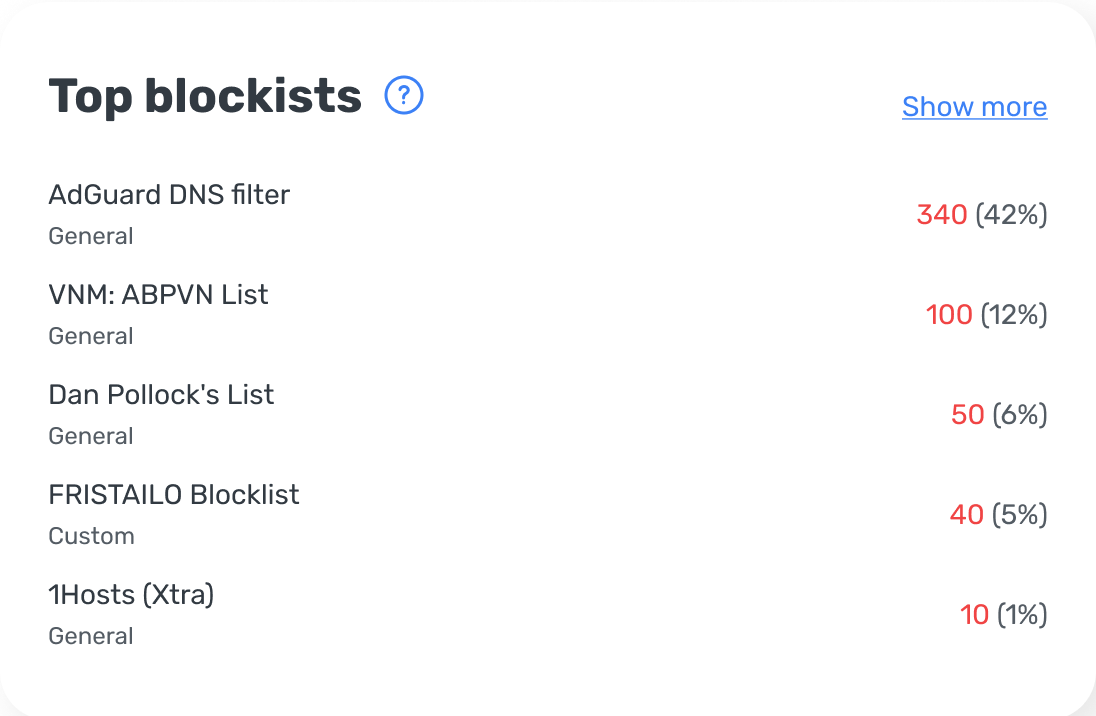
Card features:
Top 5 at a glance: The card highlights the 5 most active blocklists, showing the exact number of blocked requests for each and its percentage share relative to all blocked requests.
Flexible filters: Filter the data by time range, specific server, or device to see how lists perform across different parts of your setup.
Blocked requests are associated exclusively with the blocklist whose rule actually fired, preventing any double-counting for shared domains. The Top blocklists card displays data at the list level, so it doesn’t show which specific rule was triggered. Also, it focuses solely on blocklists — user rules and allowlists are not included.
More predictable checkout flow
We’ve updated our payment process to be clearer and more predictable. Whether you decide to upgrade your subscription or renew it, your account will only be charged once you confirm the payment at checkout.